How can I change my email Password?
To change your password for your email you will need to login to your Control Panel or Webmail panel. You may get a message that says THE SITE SECURITY CERTIFICATE CAN NOT BE TRUSTED but this is OK and you can select CONTINUE ANYWAY.
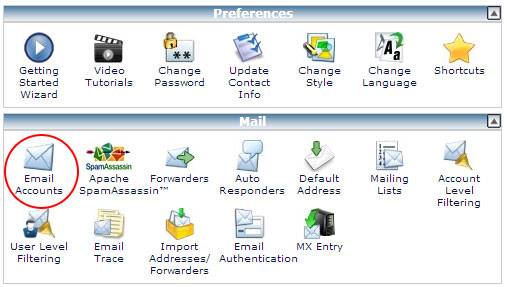
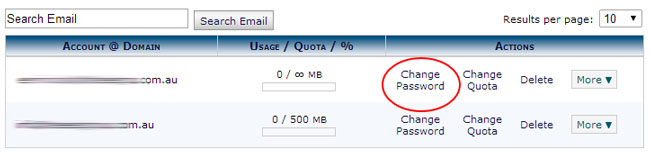
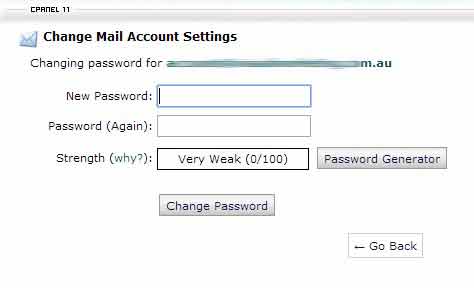
Secondly, go to "Mail" then select the email you wish to change. We suggest you use the Password Generator to generate a secure password - then change.
Alternatively you can login via your webmail access:
Go to
www.yourdomain.com.au/webmail and login using your email credentials originally sent to you. You will then have access to the "Change Password" see attached image.
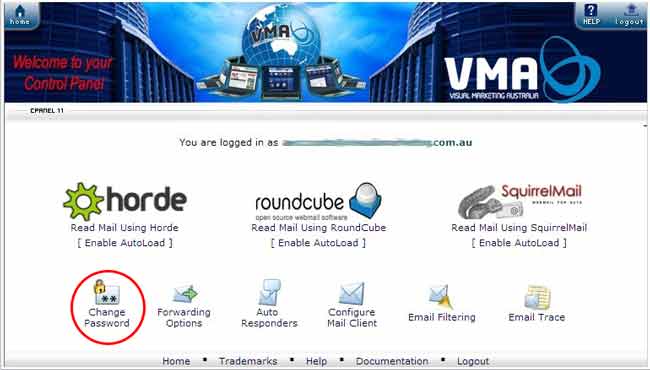
Once here you can generate a new password then "Save"
Don't forget to record your new password in a safe place.
Related Articles
Configuring Your POP or IMAP Email Account in Microsoft Outlook
Configuring Your POP or IMAP Email account in Microsoft Outlook This tutorial shows you how to set up Microsoft Outlook 2003® & 2007 to work with your e-mail account. This tutorial focuses on setting up Microsoft Outlook 2003, but these settings are ...
How do I update My CRM eMail Password?
Whenever you update your email password you will need to do the same in Zoho CRM as well to ensure you can send/receive emails via the CRM. The quickest was is to go to: Settings>Channels/Email>Email>Change Password
How to change your account's credentials
Modification of account's profile information You have the ability to change your account's credentials at any time. In order to do so, open the drop-down menu with your account name in the upper-right corner of the screen and select "My Account". On ...
Where do I change my password?
If you are a "Trial User" you will not be able to change your password UNTIL you sign up to become a "Regular User". For "Regular Users" go to "My Account" and type in a new password where indicated.
How do I create an App-Specific Password in my Zoho Account?
Steps to Create an App-Specific Password in Zoho Log in to your Zoho Account Go to accounts.zoho.com and sign in with your Zoho credentials. Access Security Settings Click on your profile picture (top right). Choose My Account. In the left menu, ...